No Android TV? Get one of these
NextGen Cable runs on Google TV and Android TV. If your TV is a Samsung, LG, Roku TV, an older TV, or installing on it is too hard, plug in one of these small, cheap devices. It turns any TV with an HDMI port into a Google TV, and NextGen Cable installs on it in a few minutes.
Our recommended devices
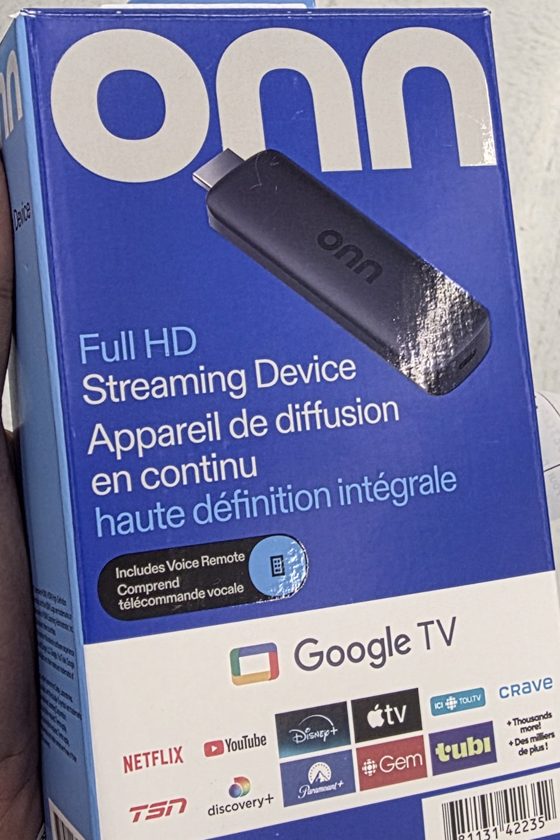
Onn Full HD Streaming Stick (Google TV)
Walmart (in store and walmart.ca). Look for this box: "Full HD Streaming Device"
- Cheapest and easiest to find; comes with a voice remote
- Smooth for one channel at a time (Home, full screen, Browse)
- Hides behind the TV, no box on the shelf
- The 4- and 6-channel layouts may stutter on it: for those, get the Onn 4K box
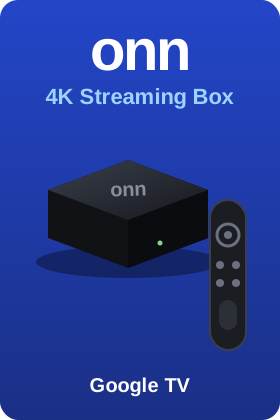
Onn 4K Streaming Box (Google TV)
Walmart (in store and walmart.ca)
- Runs everything smoothly, including 2×2, 2×3 and 1+3 layouts
- Comes with a voice remote
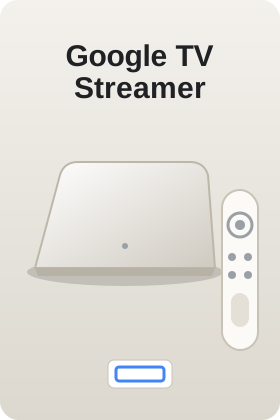
Google TV Streamer
Best Buy, Google Store
- The fastest and smoothest, if you want the best
- A used or on-sale Chromecast with Google TV works just as well
Prices are what we saw in Canada in October 2026, before tax. Stores change them often, so check before you buy. We don't sell these devices and get nothing from these stores. The Onn 4K box and Google TV Streamer pictures are our own drawings.
Please avoid
- Cheap no-name "Android boxes" on Amazon or marketplaces: they often come with hidden malware, get no updates and break quickly.
- Amazon Fire TV Stick 4K Select and other newest Fire TV models with Amazon's new system: they can't install NextGen Cable. (Older Fire TV sticks still work, see the install guide.)
- Roku, Apple TV, and smart TVs that don't run Android: NextGen Cable can't be installed on them. You can still watch on our website.
Already have Google TV?
Many Sony, TCL, Hisense, Philips and Toshiba TVs already run Google TV or Android TV. Look for "Google TV" on the box or in Settings. If yours does, you don't need a device: just follow the install guide.
Which devices work with NextGen Cable?
A quick list of what you can use. "App" means you can install NextGen Cable and our other apps (AppHub, Live TV Max, Iqra Quran); "Website" means you can watch at tv.bulkbazaar.ca in a web browser.
| Device | Works? | How |
|---|---|---|
| Onn Full HD stick, Onn 4K box (Walmart) | ✔ App | Our recommended devices, see above |
| Chromecast with Google TV, Google TV Streamer | ✔ App | Install with Downloader (install guide) |
| TVs with Google TV or Android TV built in: Sony, TCL, Hisense, Philips, Toshiba, Sharp and others | ✔ App | Look for "Google TV" or "Android TV" in the TV's Settings |
| Nvidia Shield, Xiaomi Mi Box / TV Box S and other Google-certified Android TV boxes | ✔ App | Install with Downloader |
| Older Amazon Fire TV sticks and Fire TV Cube (Fire OS) | ✔ App | Downloader from the Amazon Appstore (Fire TV tab in the install guide) |
| Android phones and tablets (Samsung, Google Pixel, Motorola and others), Android 5 or newer | ✔ App | Download from Chrome (Phone tab in the install guide) |
| Windows PC or laptop | ✔ Website | Watch at tv.bulkbazaar.ca in Chrome or Edge. A NextGen Cable app for Windows is coming |
| Mac, iPhone, iPad, Chromebook | ✔ Website only | Watch at tv.bulkbazaar.ca in Safari or Chrome. The app doesn't install on Apple devices |
| Newest Amazon Fire TV models with Amazon's new system (Vega OS), such as the Fire TV Stick 4K Select | ✘ | Can't install outside apps. Plug in an Onn stick instead |
| Samsung smart TVs (Tizen), LG smart TVs (webOS), Roku and Roku TVs, Apple TV | ✘ | Can't install Android apps. Plug in an Onn stick instead |
| Cheap no-name "Android boxes" | ✘ Not advised | May work, but often carry malware and get no updates |
Set it up yourself, step by step
About 15 minutes the first time. You need:
| 📺 | A TV with a free HDMI port, and a power socket nearby |
| 📶 | Your Wi-Fi name and password |
| 📱 | Your phone, and a Google account (Gmail). If you don't have one, the setup lets you make one for free |
1. Plug it in
- Plug the device into an HDMI port on the TV, and its power cable into the wall socket (not the TV's USB port).
- Turn on the TV and choose that HDMI input with the TV's own remote (the Input or Source button).
- Put the batteries in the new remote. When the screen says so, hold the buttons it shows to pair the remote.
2. Set up Google TV
- Pick your language, then Set up Google TV.
- The TV shows a QR code. Scan it with your phone's camera and follow the steps on the phone; it sends your Wi-Fi and Google account to the TV for you. Or choose Use remote instead and type them with the remote.
- Say yes to the questions or press Skip for the apps it suggests; you can add Netflix and others later.
- If it asks to update, let it finish. You now see the Google TV home screen.
3. Install the Downloader app
- On the home screen, open Search, type Downloader, and install Downloader by AFTVnews (orange icon).
- Allow it to install apps: open Settings › System › About, press OK on Android TV OS build 7 times until you see "You are now a developer".
- Go back to Settings › Apps › Security & restrictions › Unknown sources, and turn on Downloader.
4. Install NextGen Cable
- Open Downloader, allow it to access files if it asks, and type this in the box:
tv.bulkbazaar.ca/get - Press Go. Wait for the download (about 22 MB), then press Install.
- If Google Play Protect warns you, choose More details › Install anyway. NextGen Cable isn't in the Play Store, so Google always shows this.
- Press Open. NextGen Cable shows a code: on your phone go to google.com/device (or scan the QR code), enter the code and pick your Google account. You only do this once.
5. Make it easy to find
- On the home screen, highlight NextGen Cable, hold OK and choose Add to favourites, then move it to the front so it's the first app you see.
- Optional: in Downloader, type tv.bulkbazaar.ca/bazaar to get AppHub, which installs and updates all our apps with one click.
Need help?
Stuck on a step? Send us a message on WhatsApp at 437 602 6500, or post on the Suggestions page, and we'll help you. For common problems, see the "Problems" tab in the install guide.